Feedback that points
at the pixel.
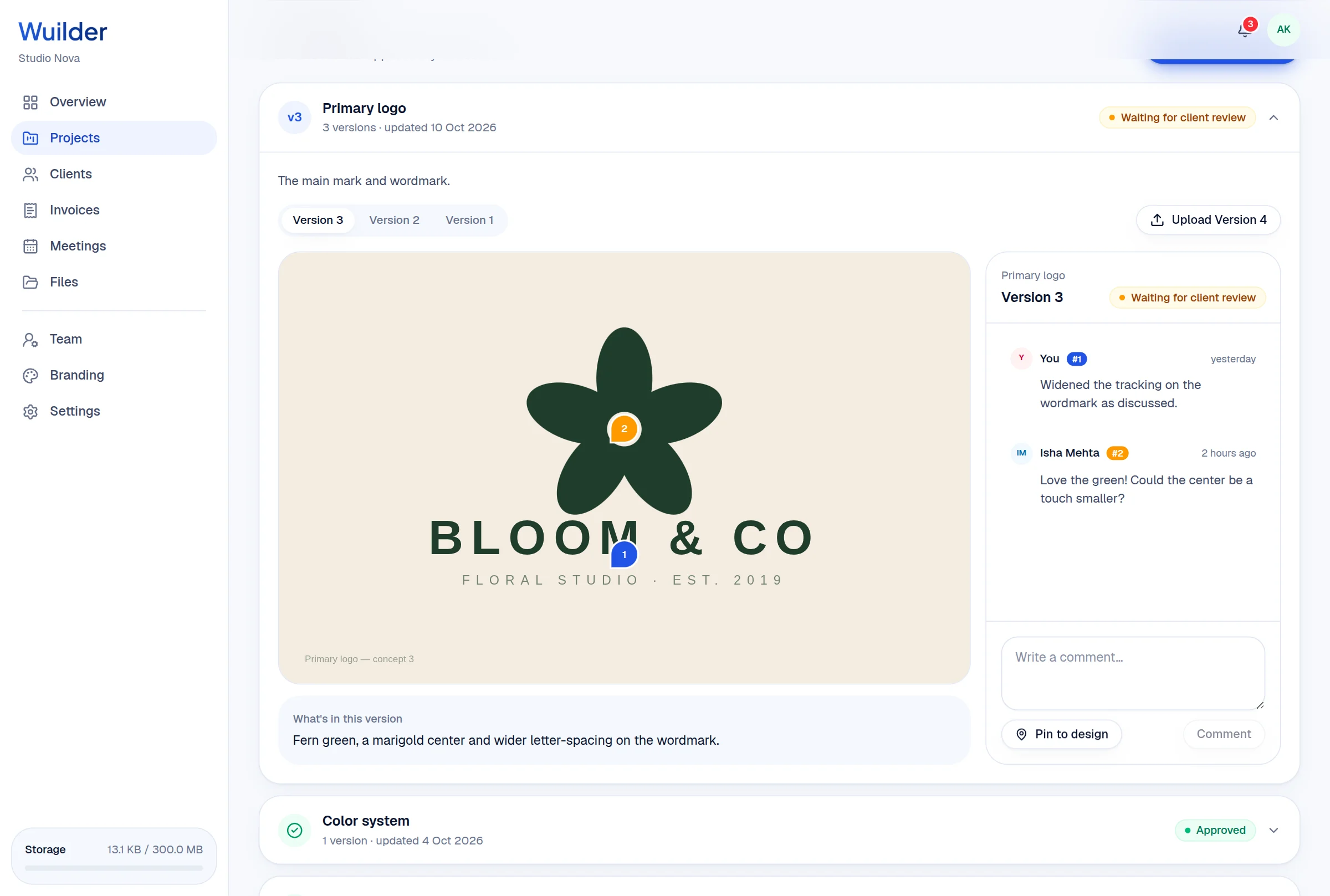
Upload a version, and your client reviews it right on their overview: pin a comment on the exact spot, approve it, or ask for changes. Every version stays in the history.
A 20-second walkthrough, recorded in the real product.
The old way, without Wuilder.
- “Make the thing on the left bigger” — which thing?
- Feedback scattered across email, WhatsApp and calls
- Not knowing which version was actually approved
Three steps. No setup.
Upload a version
An image, a PDF or a Figma link, with a note on what changed.
Client pins feedback
They click on the design to leave a comment on that exact spot — numbered pins you can't misread.
Approve or iterate
Approve locks that version as final. Request changes and the next version starts a fresh round.
Protected preview
No right-click saving or dragging out of the viewer.
Full history
Version 1, 2, 3 — with notes and comments kept on each.
Approved by client
Who approved what, and when, on record.
Questions, answered.
Common questions about design reviews & approvals in Wuilder.
Still curious? Talk to a human — we reply within a day.
Works even better together.
Your next client should feel the difference.
Set up your first project in minutes. Send a branded portal link instead of a Drive folder — and watch how differently the conversation about price goes.